4 min read
You do not need a studio to look good on camera. Most of the difference comes from three things you can change in five minutes: where the light comes from, where the camera sits and what is behind you. Add clear sound and you look and sound professional in every meeting. This guide covers each step, plus the virtual background for days when the room is a mess.
1. Light from the front
Light is the biggest factor. A camera in a dark room makes a grainy, blurry picture, and a window behind you turns you into a silhouette.
- Face the window. Daylight from the front is the best light there is, and it is free.
- No window behind you. If you cannot move, close the curtains behind you.
- Add a lamp at night. Put a lamp behind your screen, pointing at you. A sheet of white paper on the desk bounces light up and softens shadows.
- Avoid light from above only. A ceiling light alone makes dark eyes. Add a light at face height.
2. The camera at eye level
A laptop on a desk films you from below. Put it on a stack of books so the camera sits at the height of your eyes. Sit about an arm's length away. Your head and shoulders should fill the picture, with a little space above your head.
- Look at the camera, not at the faces, when you make an important point. It feels like eye contact to the others.
- Move the meeting window close to the camera, so your eyes stay near it.
- Turn on Mirror my video in the room settings if your own preview feels strange. It only changes what you see; the others see you normally.
3. A calm background
A plain wall, a tidy shelf or a plant works well. Avoid busy patterns, bright screens and people walking behind you. When the room is not ready, use a virtual background.
Use a virtual background or blur
- In the meeting, open More and choose Virtual background.
- Pick Blur or Strong blur to soften the room, or one of the ready pictures: office, living room, gradient or bookshelf.
- Or choose My picture and upload your own image. It stays in your browser; nothing is uploaded to the server.
- Pick None to switch it off.
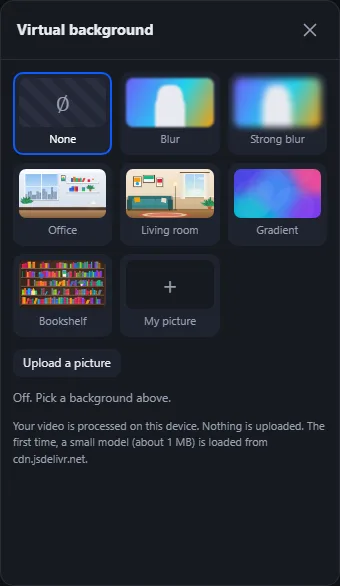
The background runs in your browser and is remembered for the next meeting. It is a plugin, so you see it when the site owner has switched it on. It works best with good light and a calm room behind you, because the browser can then tell you apart from the background more easily.
Tip: on a slow computer or a weak connection, a blur is lighter than a picture. If your video stutters, switch the background off. See video calls on slow internet.
4. Sound matters as much as picture
People forgive a soft picture. They do not forgive bad sound. Use headphones with a microphone, even simple phone earphones. They stop echo and bring your voice closer. Close the window if the street is loud, and mute yourself when you are not speaking. Hold Space to talk while muted.
5. A two-minute check before important calls
- Open the meeting early and look at the preview.
- Check the light on your face and the space above your head.
- Look at the background, or pick a blur.
- Say a few words and watch the microphone level move.
- Close other apps that may pop up or use the camera.
If the camera or the microphone does not work at all, read how to fix camera and microphone problems. Leading team calls? Our post on remote team meetings has more ideas.
Frequently asked questions
Does my virtual background picture get uploaded?
No. The background is made in your browser, and your own picture stays in your browser. The others only see the finished video.
Why does the virtual background cut off my hair or hands?
The browser has to guess where you end and the room begins. Better light and a plain wall behind you help. A blur hides small mistakes better than a picture.
What is the best cheap upgrade for video calls?
Light from the front and a pair of earphones with a microphone. Both cost little and improve the call more than a new camera.
Why do I look mirrored to myself?
Many people prefer to see themselves like in a mirror. Switch Mirror my video in the room settings. It only changes your own view. More tips are in the Help Center.